5 Branded LED TVs With Better Motion Handling That Reduce Blur in Fast Scenes
Samsung, TCL, and Xiaomi LED TVs handle motion better with smoother frame transitions and panel control, so fast scenes like sports and action stay clearer without that usual blur or trailing effect.
Fast scenes are where most TVs start showing their limits. You will notice it during cricket, racing, or even quick camera pans, the picture just cant keep up and things look slightly blurred. That usually comes from the panel not refreshing fast enough or poor frame handling. Samsung handles this more from the panel side, keeping motion tighter so it does not look messy. TCL leans into frame processing, where extra frames are added to smooth things out, especially useful in sports. Xiaomi keeps it practical, not too aggressive, but enough to stop that shaky feel in regular viewing. The difference shows when movement stays clean instead of leaving a trail. That is what actually improves the experience, not just higher resolution or brightness.
Motion blur mainly comes from slow panel refresh and weak frame handling. A higher refresh rate helps frames update faster, while motion processing fills gaps between frames. Good backlight control also matters, it keeps moving objects sharper instead of leaving a faded trail behind.
Vetted Options
We thoroughly evaluate every product through a combination of hands-on research and insights from reputable industry sources.
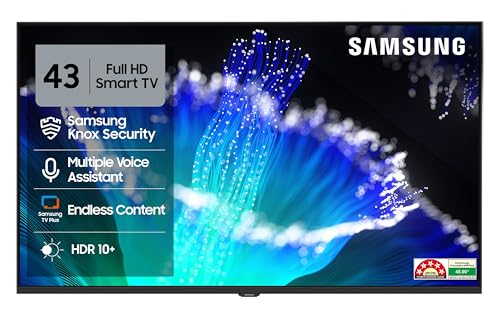
Samsung 108 cm (43 inches) FHD Smart LED TV
This Samsung 43 inch model keeps motion under control in a more practical way. It is a 50Hz panel, so it is not chasing high numbers, but the picture processing does a decent job keeping fast scenes watchable. During sports or quick cuts, you wont see heavy smearing, frames stay reasonably clean. Micro dimming pro plays a small but useful role here. HDR10+ support helps maintain detail when brightness shifts quickly, which matters more than it sounds during action scenes. Audio is clear enough for daily use with 20W output, and object tracking sound Lite adds a bit of direction to what you hear. Tizen OS runs most apps without confusion, and features like screen mirroring and HDMI eARC make setup easy with other devices.
Specifications:
BrandSamsung
ColourBlack
Warranty1 Year + 1 Year Panel
Dimensions7.9D x 95.6W x 56.1H cm
ModelUA43F5550FUXXL
ManufacturerSamsung
Customer Reviews4.1/5
ASINB0F84DKX8K
Country Of OriginIndia
Reasons to buy:
✓Good frame handling for a 50Hz panel, less visible blur in regular viewing
✓Reliable smart features with stable app support and free live TV channels
Reason to avoid:
✗Startup and app loading can feel slow at times
01
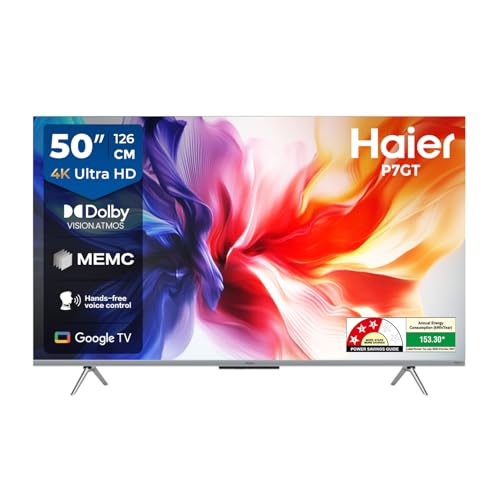
Haier 126 cm (50) P7GT Series 4K Ultra HD Smart LED Google TV 50P7GT-P (Grey)
This Haier 50-inch TV handles motion in a more noticeable way compared to basic models. It is still a 60Hz panel, but MEMC steps in when scenes move fast. While watching sports or quick camera pans, frames dont break as much, things look more continuous instead of slightly jumpy. Dolby Vision helps when brightness changes suddenly. In darker or very bright scenes, details dont drop off easily, which actually makes moving visuals easier to follow. Contrast is decent too, so objects dont just blend into each other during motion. If you connect a console, VRR and ALLM help keep things more responsive, especially in fast gameplay. Sound is a bit stronger than usual because of the subwoofer, so it does not feel flat. Google TV runs fine for daily use without that constant lag feeling.
Specifications:
BrandHaier
ColourSilver
Warranty2 Years
Dimensions28.7D x 111.1W x 71.1H cm
Model50P7GT-P
ManufacturerHaier
Customer Reviews4.6/5
ASINB0DZP6FVRW
Country Of OriginIndia
Reasons to buy:
✓MEMC keeps motion smoother in sports and action scenes
✓Dolby Atmos with subwoofer gives fuller sound than typical TVs
Reason to avoid:
✗Native refresh rate is still limited to 60Hz
02
Our Core Values
Transparent, Honest Reviews
We provide straightforward insights into each product’s strengths and weaknesses, so you can make confident, informed decisions.
Trusted Brands Priority
We focus on products from reliable brands known for quality, consistency, and customer satisfaction.
Smarter Value for Your Money
We highlight products that strike the perfect balance between cost, quality, and performance, so you get true value without the extra cost.
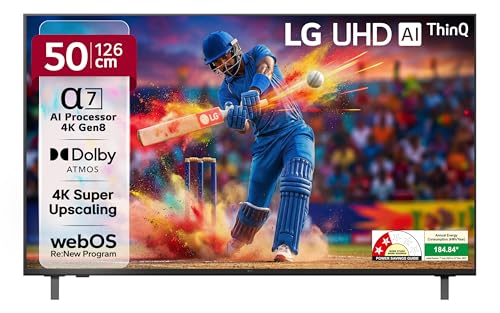
LG 126 cm (50 inches) UA82 AI Series 4K Ultra HD (3840 x 2160) Smart webOS LED TV 50UA82006LA
This LG 50-inch TV handles motion in a more steady way instead of trying to smooth everything out. It’s a 60Hz panel, but the processor keeps fast scenes from falling apart. During sports or quick pans, players stay clearer and you don’t see that soft blur spreading around edges. When brightness shifts quickly, Dynamic Tone Mapping helps keep details in place, so scenes don’t suddenly look dull or washed. Upscaling also plays a role, lower-quality content looks more stable, which indirectly makes motion feel cleaner. For gaming, ALLM keeps response quick enough, so movement doesn’t feel delayed. Sound is not very loud, but it spreads better across the room. WebOS is simple to use, apps open without much waiting, and everything feels easy to manage.
Specifications:
BrandLG
ColourBlack
Warranty1 Year
Dimensions6.8D x 112.2W x 65.4H cm
Model50UA82006LA
ManufacturerLG Electronics
Customer Reviews4.0/5
ASINB0FB35J4B6
Country Of OriginIndia
Reasons to buy:
✓Motion stays controlled without over-smoothing, better edge clarity
✓Strong upscaling helps even low-quality content look stable
Reason to avoid:
✗Brightness is limited, not ideal for very bright rooms
03
Xiaomi 138 cm (55 inch) X Ultra HD 4K Smart Google LED TV L55MB-AIN
This Xiaomi 55-inch TV handles motion better than most in this price range. It still runs on a 60Hz panel, but the DLG mode and MEMC make a visible difference. During sports or fast scenes, you dont get that slight jerk again and again, movement feels more even. Dolby Vision helps when scenes switch between bright and dark, so details don't suddenly disappear. The picture engine keeps things sharp enough, so moving objects don't look messy. Sound is a bit stronger here with 34W output, so it does not feel too flat in a normal room. Google TV works fine for regular use, though it can slow down a bit if you keep jumping between apps. Connectivity is complete, so adding devices is not an issue.
Specifications:
BrandXiaomi
ColourBlack
Warranty1 Year + 1 Year Panel
Dimensions31.2D x 122.6W x 77H cm
ModelL55MB-AIN
ManufacturerXiaomi
Customer Reviews4.1/5
ASINB0F6YVKDR2
Country Of OriginIndia
Reasons to buy:
✓MEMC and DLG mode make motion smoother than standard 60Hz TVs
Sony BRAVIA 80 cm (32 inches) HD Ready Smart LED Google TV KD-32W825 (Black)
This Sony 32-inch TV handles motion in a cleaner way than most small TVs. It is not about a higher refresh rate here; it is how MotionFlow XR works with the panel. During fast scenes, you dont see that shaky or broken movement, frames stay more connected. For sports or quick camera pans, this makes a visible difference. X-Reality PRO also helps by refining lower-quality content. It reduces noise and keeps edges clearer, so moving objects don't look rough. As it is an HD-ready panel, the picture does not fall apart during motion like many budget TVs. Sound is straightforward but clear with 20W output, and voices come through properly. Google TV runs smoothly for daily use, apps open without much delay. It is a simple setup overall, but motion handling is where it stands out.
Specifications:
BrandSony
ColourBlack
Warranty1 Year
Dimensions7.5D x 73W x 43.7H cm
ModelKD-32W825
ManufacturerSony
Customer Reviews4.7/5
ASINB0D3DVRRKW
Reasons to buy:
✓MotionFlow XR keeps fast scenes stable with less visible blur
✓Clean picture processing even on lower resolution content
Reason to avoid:
✗HD Ready resolution feels limited on a bigger viewing distance
05
5 Branded LED TVs With Better Motion Handling: Feature Comparison
These TVs differ in how they handle motion; some rely on processing, others on panel control or MEMC. This comparison highlights refresh rate, motion tech, HDR support, and overall handling approach.
Disclaimer: At The Daily Jagran Smart Guide, we prioritize providing up-to-date information on the latest trending commodities and goods. Links in this article are affiliate links. Please note that our product recommendations are based on independent research and analysis however, The Daily Jagran Smart Guide shall not be held liable for any claims, damages, or disputes arising under applicable laws, including the Consumer Protection Act, 2019. Any issues regarding product quality, delivery, or warranties must be directed to the respective manufacturer or seller. Furthermore, the products featured in this article are organized for reader convenience and are listed in no particular order of priority or ranking.
Faq's
Does 120Hz really reduce blur?
+
Yes, but only when the panel is actually 120Hz. Otherwise, most TVs depend on processing to make motion look smoother.
Should MEMC be kept on all the time?
+
Works well for sports. For movies, many people turn it down because it can make scenes look a bit unnatural.
Why do faces look unclear during fast scenes?
+
Because frames are not updating cleanly. When motion handling is weak, details start blending instead of staying sharp.